News

December 2025 - Errata #5 - bug fix release

We have released SCHLIX CMS v2.2.9-5 (errata #5) today to fix some bugs. Changes:

  • Fixed gallery macro that didn't include the correct CSS
  • Corrected User application that displayed incorrect history when clicking the New User (the fix was to remove the History tab completely on new user)
  • Fixed XSS vulnerability bug when clicking New User (thank you to Akıner Kısa who reported this security bug and provided reasonable time to fix)
  • Updated CA certificates

August 2025 - Errata #3 - bug fix release

The second errata (v2.2.9-3) for SCHLIX CMS has been released today. Changes:

  • Added support for Bootstrap 5 CSS framework (still defaults to Bootstrap 4 for the time being).
  • More fixes for PHP 8.4 compatibility
  • Fixed incorrect custom header image display for Blog app
  • HTML (Web Pages) app will redirect to the frontpage if the first index page is called when the app is not the main frontpage application
  • Fixed minor issues in default themes
  • Fixed frontend edit control not loading if the main frontpage application is set to Landing Page
  • Fixed Google Analytics block module
  • Fixed menu generation for divider and parent submenu
  • Removed "php_flag short_open_tag off" from the default .htaccess file (we will give a warning in the future if php_flag_short_open_tag is enabled)

June 2025 - Errata #2 - further PHP 8.4 fixes

Today, the first errata (v2.2.9-2) for SCHLIX CMS has been released. There's only minimal changes compared to the previous release:

  • Further PHP 8.4 compatibility fixes
  • Updated FontAwesome 5 Free to 6 Free
  • Fixed cookie issue if the CMS runs on non-standard port 80/443 - this could be an issue if you're running SCHLIX CMS on Docker for testing

March 2025 - PHP 8.4 compatibility release

SCHLIX CMS v2.2.9 has been released. This release mainly updates the code to be compatible with PHP 8.4 while still maintaining compatibilities with PHP 8.0 - 8.3, PHP 7.0 - 7.4, and PHP 5.6.

Some notable changes:

  • Bootstrap 3.4.1 javascript has been updated to v3.4.6 (by 7pro.ca) with CVE-2024-6484 (low risk XSS cross site scripting bug)
  • Bootstrap 4.6.2 javascript has been updated to v4.6.3 with our own custom fix for CVE-2024-6531 (low risk XSS cross site scripting bug)
  • A small change in the way of session handling due to PHP 8.4's change of session_set_save_handler(). This change should still be compatible with PHP 5.6.
  • We've disabled short_open_tag for all new default installation (doesn't affect old installation - please manually update by yourself) for better security.
  • PHPMailer 6.7.1 to v6.9.3
  • HTMLPurifier 4.15 to v4.18
You can download this new release here. To upgrade your existing installation, simply click Settings - System Update. If you encounter any bugs or have any questions, simply post it in the forum.

February 2024 - bug fix release

SCHLIX CMS v2.2.8-2 has been released. List of fixes:

  • PHP version 8.2, 8.3 and 5.6 compatibility fixes. It's still compatible with PHP 7.x as well. Please note that while we try to maintain compatibility even with PHP 5.6 (which was released 10 years ago in 2014), may not be guaranteed to be v5.6 compatible next year.
  • Fix for a low-risk SQL injection bug in the Configuration section. Thanks to devious.ch for reporting this. This is considered lower risk as it still requires an administrator privilege to execute it.
  • JQuery - updated to v3.7.1
  • PHPMailer - updated to v6.9.1

To upgrade your existing installation, simply click Settings - System Update.


CVE-2022-45544 for SCHLIX CMS v2.2.7-2 is FALSE

The following is a response to CVE-2022-45544 (2022-11-09) authored by Francisco Marinho, who claimed that there is an "Insecure Permission vulnerability in Schlix Web Inc SCHLIX CMS 2.2.7-2 [that] allows attacker to upload arbitrary files and execute arbitrary code." The analysis is incorrect due to the following reasons:

  1. You need an admin access and his proof of concept didn't demonstrate any unauthorized access to the Theme Manager within SCHLIX CMS.
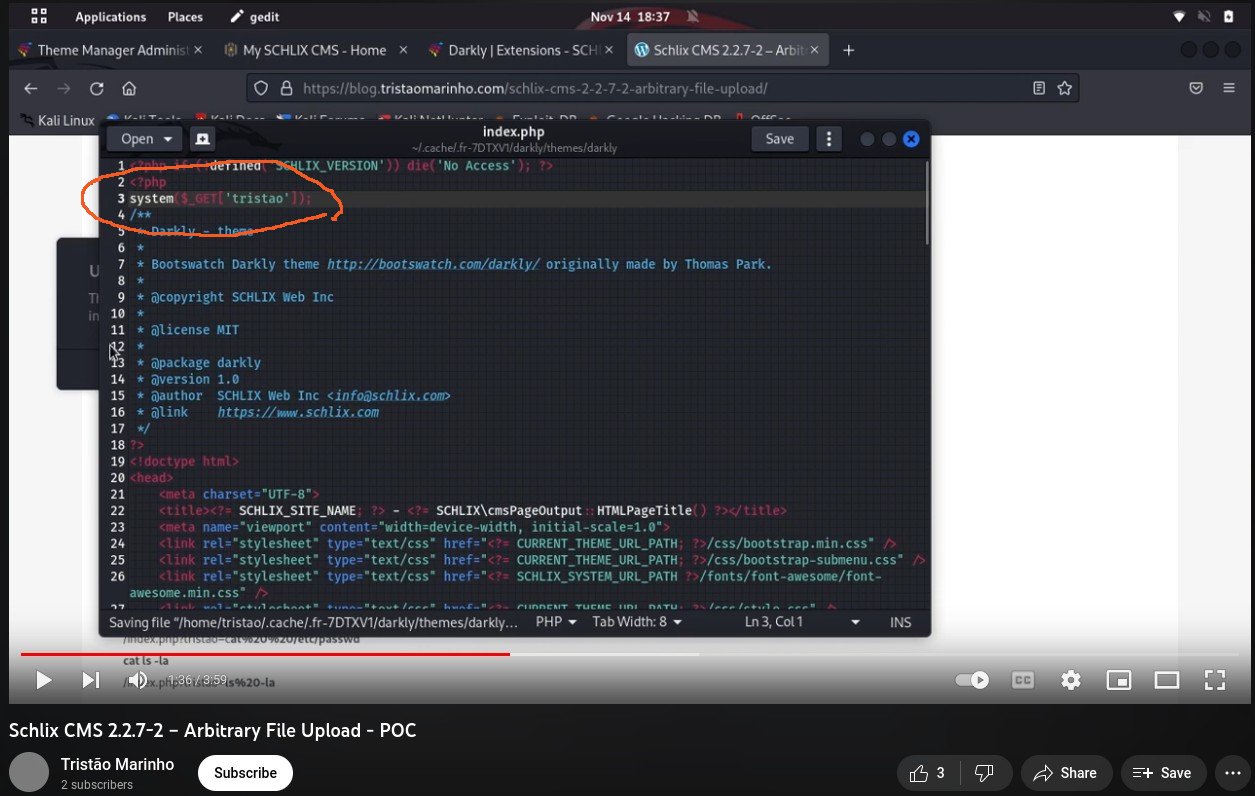
  2. If you write a piece of code in the theme's index.php (e.g. system($_GET['tristao']) ) and upload it, of course you can execute it. In any PHP-based CMS where PHP code is allowed in the theme, you can write anything you want, including system ("rm -rf /") and this is NOT AN ERROR and there is NO UNEXPECTED BEHAVIOUR. You can test this with other PHP-based CMS such as Wordpress, Joomla, or Drupal and the behaviour is identical and this is NOT a vulnerability. If you want to disable a certain PHP function deemed dangerous, do it with disable_functions in php.ini.
  3. There is already a warning in the upload form that you should upload only from a trusted source. We're not responsible for any vulnerability caused by 3rd party plugins. See the second screenshot below.

Francisco's proof of concept, as described in https://github.com/tristao-marinho/CVE-2022-45544/blob/main/README.md and https://www.youtube.com/watch?v=_0X6AzXmhrU, is as follows:

  1. Login with your account
  2. Access the directory in url http://[examplewebsite].com/admin/app/core.thememanager
  3. Download theme Superhero in https://www.schlix.com/extensions.releases/action/download/filename/theme_superhero-1.1.zip
  4. Unzip theme_superhero-1.1.zip
  5. Edit file in path superhero/themes/superhero/index.php, adding "system($_GET['tristao']);" on line three.
    • Our response: You can add any code here because it's a PHP script. You can execute system ("rm -rf /") or whatever and it will call the system(...) function unless you disable it via php.ini

      Incorrect POC
  6. Zip theme_superhero-1.1.zip
  7. Click in "INSTALL A PACKAGE"
    • Our response: It prompts for the admin password again and there is a warning to upload files only from a trusted source and that we're not responsible for any security vulnerability caused by 3rd party plugins. This is why we put the warning here. People who have access to this are usually web developers who know what they're doing.
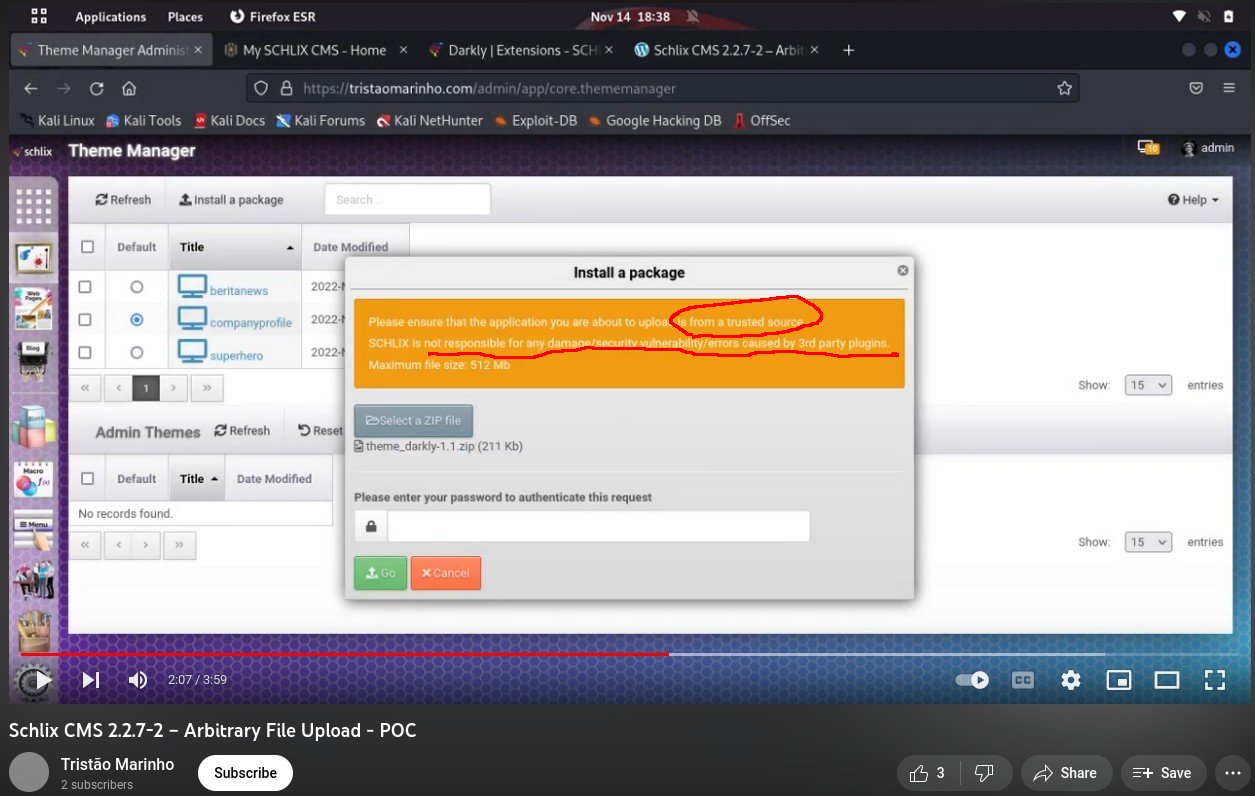
      Upload stage of invalid POC
  8. Upload theme_superhero-1.1.zip
  9. Active theme superhero
  10. Acess homepage index.php
    Our response: You are an admin of this website and you put an arbitrary code in the theme file, which is index.php, and you should be able to execute it. This behaviour is the same whether you use Wordpress, Drupal, Joomla, or SCHLIX CMS.
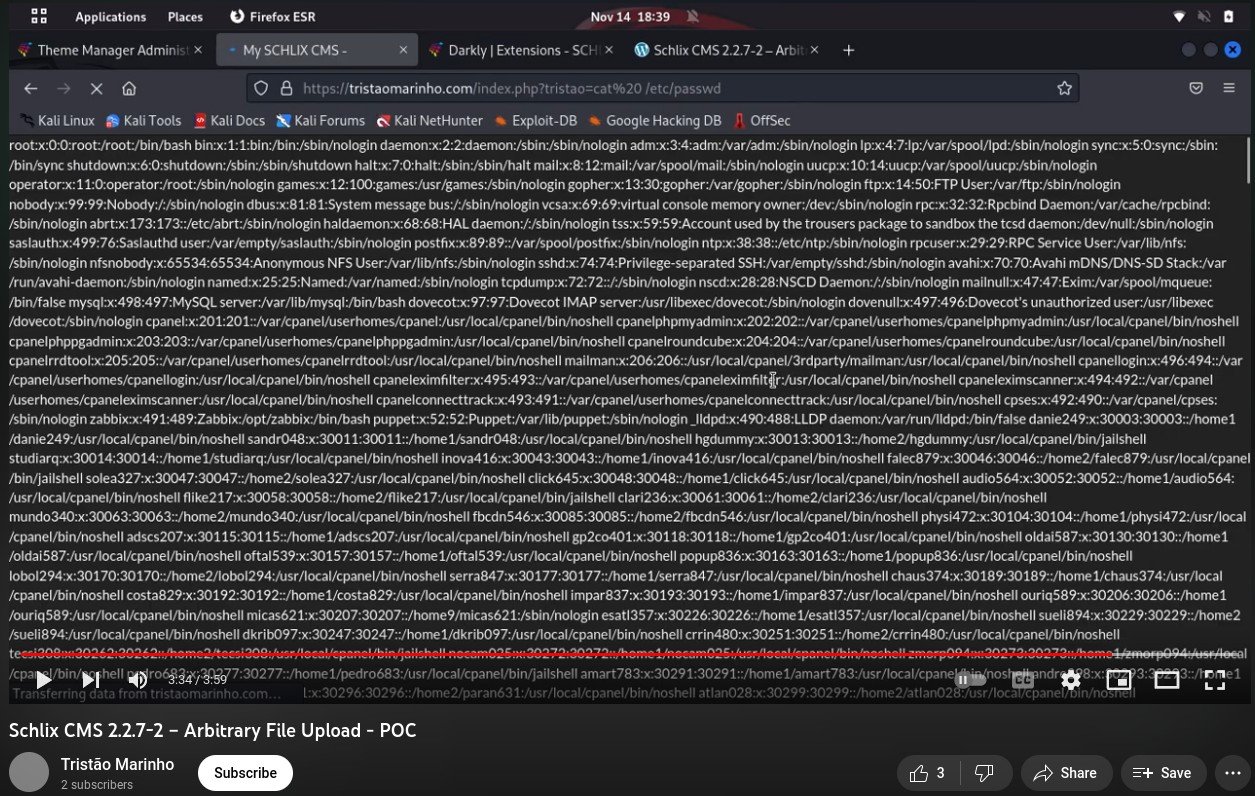
    Sample output of incorrect analysis - CVE-20222-45544

Not only the analysis is faulty and demonstrated a lack of due dilligence and programming knowledge on the so called "pentester" part, we weren't even contacted to verify his claim, which is usually the standard procedure for reporting a vulnerability. We have dealt with much more professional and knowledgable individuals in the past and we will acknowledge if there is a vulnerability, but Francisco's analysis for CVE-2022-45544 is completely faulty.

It's best for security researchers to contact us first to validate a vulnerability before publishing it.

January 2023 Update - SCHLIX CMS v2.2.8 release with GPLv3 license

C

SCHLIX CMS v2.2.8 has been released with the following changes:

  • License has been changed to GPLv3
  • Fixed a few PHP 8.1 compatibility issues
  • JQuery, PHPMailer and HTMLPurifier have been updated to the latest version
  • A few bug fixes

PHP8.0 compatibility release - v2.2.6

SCHLIX CMS v2.2.6 has been released and it is the first release of 2021 with major focus on the new PHP 8.0 compatibility.

With the v2.2.6 release, the core SCHLIX content management system will be compatible with PHP from version 5.6 to 8.0. However, this may not always be the case with its add-ons (especially if it uses composer), which are not always developed in house.

There could a secondary compatibility release in February or March once we've completed further testing with the next release of PHP 8.0.x. The main issue for the current PHP version (8.0.0) is the incompatibility if the JIT is enabled (off by default). Please note that during our testing, we encountered segmentation fault as described in https://bugs.php.net/bug.php?id=80480. Other than this issue, everything else seems to works.


Time to upgrade again - SCHLIX CMS v2.2.5 has been released with support for OAUTH2-based email authentication

SCHLIX CMS v2.2.5 has been released and it has a new feature: support for SMTP authentication with OAUTH2, which is needed if you use SMTP servers of Google Workspace/GSuite or Outlook.com/Office365. You can read more about how to set it up in here: https://www.schlix.com/documentation/v2/configuration/using-gmail-as-the-default-smtp-server.html. Other than this feature, the new version also contains many updates including:

  • New constant SCHLIX_DEFAULT_CA_BUNDLE containing the path location /system/libs/data/ca-bundle/ca-bundle.pem, which is the most up-to-date certificate authority bundle file in the current release. This is necessary as the default file location varies among different operating systems. This is also needed for some of the shipping & payment plugins of Shoperatus.
  • Support for Samesite Cookie = None for different browsers
  • A more descriptive error for session timeout for AJAX requests
  • Fixed: SMTP settings error when changing the SSL option in Site Manager
  • Fixed: Initial menu base path settings
  • Updated - CKEditor 4.11 to 4.15
  • Updated - Bootstrap 4.3.1 to 4.5.2
  • Updated - TinyMCE 4.9.2 to 4.9.8
  • Updated - CodeMirror 5.25 to 5.57
  • Updated - PHPMailer 6.1.4 to 6.1.7
  • Updated - Fontawesome Free 5.11.2 to 5.15.1

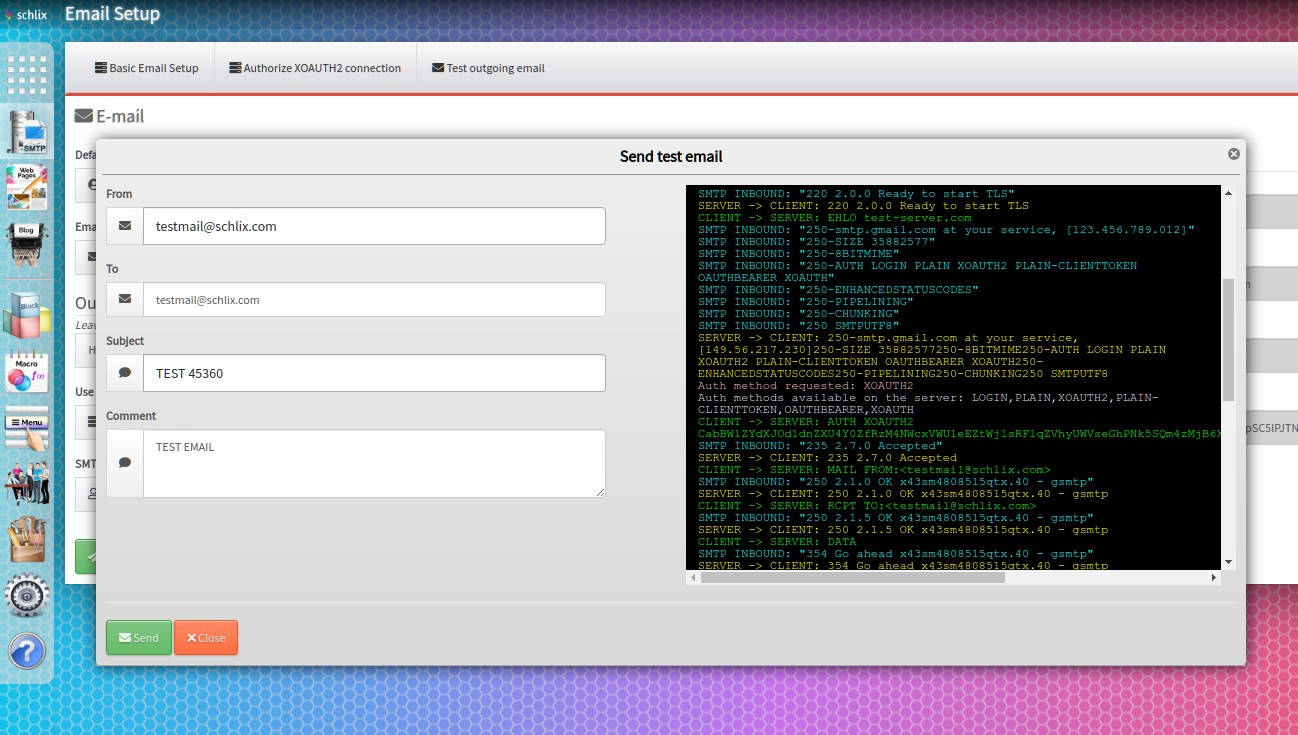
Screenshot of the SMTP OAuth test:

GMail SMTP OAUTH2 settings test

To upgrade your existing installation, simply click Settings - System Update.


First BETA release of Shoperatus v0.9 (e-commerce for SCHLIX CMS)

As planned earlier, we finally released the first generally available e-commerce for SCHLIX CMS for the first time. We were a few days behind our schedule (we were supposed to have released this last Friday) but it's finally here. The first Shoperatus v0.9 BETA has been released. Please note that in order to use this, you must have already have ionCube loader on the server (or on your local workstation).The good news is 99% of PHP web hosting companies have ionCube loader pre-installed by default. 

Unlike SCHLIX CMS, which source is pretty much open, Shoperatus is a closed source software. However, you can still edit and customize the view templates as with other SCHLIX CMS extensions we previously released. The platform itself is still open so that you will be able to create your own payment, shipping and other types of plugins. We will also publish documentation and training manual for this. Since this is the first day of the beta release, not much documentation is available yet, but we're working on it. Note that although Shoperatus is the generally available e-commerce extension, there has been another e-commerce extensions of SCHLIX CMS with slightly different purpose since 2018 but it's only available to commercial clients. You can see this on the demo/showcase screenshot of this website.

Some of the shipping plugins in the screenshots such as AsiaXpress, SpeedPost, IndiaPost and ThailandPost as well as a couple of payment plugins (Xendit - token and Moneris hosted tokenization) will only be available with a commercial license. Note - the free version of Xendit and Moneris hosted payment page are just as good for starters.

We will also release most commonly used shipping plugins such as Purolator, DHL, Fedex and USPS soon.

E-commerce for SCHLIX CMS (PHP/MySQL)